
The One and Only Floating Taxi Meter for iOS: Over Google Maps and Waze on iPhone
The Short Answer
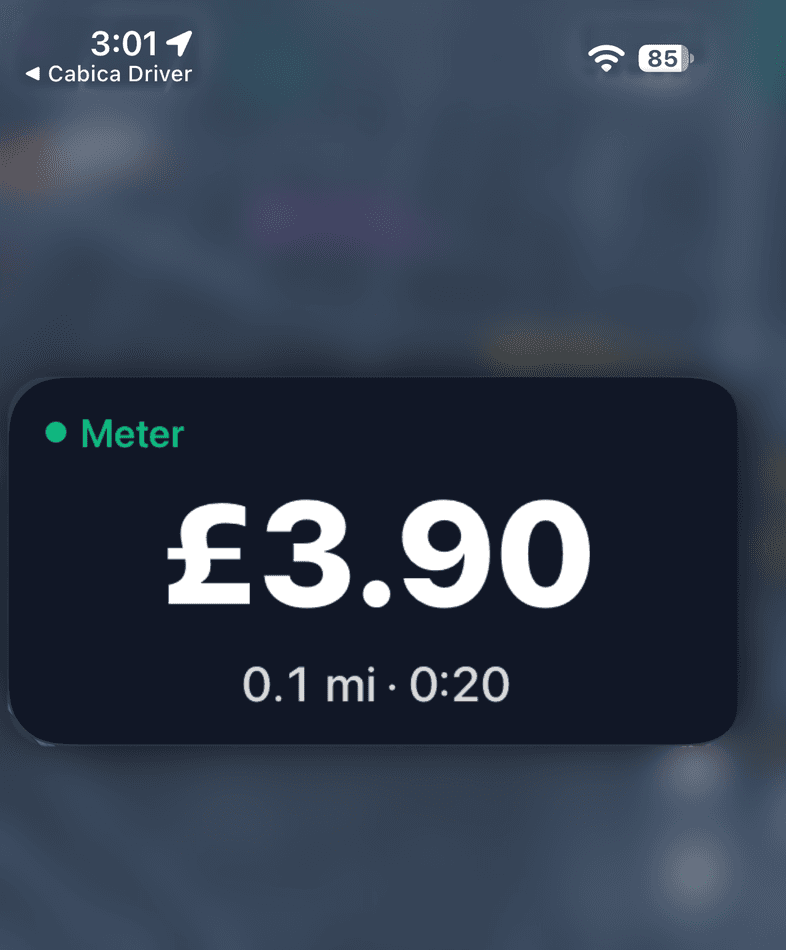
Yes, and as of 26 October 2026 there is one: Cabica Driver is, to date, the one and only taxi driver app for iPhone whose meter floats over other apps. While a metered trip runs and the driver navigates in Google Maps, Waze or Apple Maps, the fare, time and distance stay on screen on top of the map, updating every second. Other iPhone driver apps that advertise a floating meter show it only over their own screens and their own built-in map. Apple approved it on 26 October 2026.
For years, a taxi meter that stays on screen while the driver navigates has been an Android thing. Android lets an app draw over other apps, so a meter bubble can sit on top of Google Maps or Waze, and Cabica Driver has had one there for a long time. iPhone does not offer that, and every iPhone driver app we know of has worked around it the same way: by keeping the driver inside its own app.
On 26 October 2026, Apple approved Cabica Driver 11.6 for iPhone. With it, the meter floats over whatever app the driver has open, exactly as it does on Android. To date, it is the one and only iOS taxi driver app that does this.
What a floating meter should mean
A floating meter has one job: the driver can see the fare without leaving the map they are navigating with. Most drivers have a map app they trust, usually Google Maps or Waze, and they navigate with it all shift. A meter that only floats inside the driver app does not do that job, because the moment the driver opens their own map, the meter is gone.
So the test is simple. Start a metered trip, tap Navigate, and look at the screen. If the fare is there on top of Google Maps or Waze, the meter floats. If the driver has to switch back to the driver app to see it, the meter lives inside an app.
What other driver apps call a floating meter
At least one other driver app has advertised a “floating meter for iOS”. Read the description closely and it is a meter overlay on top of that app’s own screens: the app has its own map and turn-by-turn directions, and the meter sits over them. That is useful while the driver stays inside the app. But switch to Google Maps or Waze, as most drivers do, and the meter is no longer on screen.
| A meter inside the driver app | The floating meter in Cabica Driver | |
|---|---|---|
| Where the fare is visible | On the driver app’s own screens | Over any app the driver opens |
| Navigation | The driver app’s built-in map | Google Maps, Waze or Apple Maps, the driver’s choice |
| When the driver opens another app | The meter is gone | The meter stays on screen |
| iPhone and Android | Varies | Both |
What Cabica Driver does on iPhone
While a metered trip is running:
- The meter floats over other apps. Google Maps, Waze, Apple Maps, or anything else the driver opens. It shows the fare, the distance and the time, and updates every second.
- It appears by itself. When the driver taps Navigate, or leaves Cabica Driver mid-trip, the meter comes with them. When they come back to Cabica Driver, it goes away again, because the trip screen already shows the meter.
- It stays out of the way. The driver can move it so it does not cover the directions they need.
- It is on the lock screen too. The fare also shows on the lock screen, and at the top of the screen on iPhones with the Dynamic Island (iPhone 14 Pro and newer).
- It ends with the trip. Complete the job and the floating meter and the lock-screen fare both clear.
- An agreed price says so. On a fixed-price job the meter says “Fixed Price” instead of counting, so the driver and the passenger see the price that was agreed.
It needs iOS 17 or later, which Cabica Driver already requires, and it is in every Cabica Driver release from 11.6 onwards. Android drivers keep the floating meter they already have.
Why it matters on a real shift
Fewer glances away from the road
Without a floating meter, checking the fare means leaving the map, opening the driver app, and finding the way back to the directions. That is three taps at a junction. With the meter floating over the map, it is a glance.
Fewer arguments about the fare
“How much is it so far?” is easy to answer when the number is on the screen the whole time. A passenger who can see the fare climbing has nothing to dispute at the end, and a driver who can see it never has to guess.
Drivers keep the map they trust
Drivers have strong views about maps. Forcing them onto a built-in map so the meter stays visible is one more reason for a fleet to resist a new system. With the meter floating, the driver navigates with whatever they already use.
What the office controls
Firms decide what their drivers see. In the dispatch console, App Settings → Driver App has a switch for the floating meter. Turn it off and it never appears, on iPhone or Android. A firm that hides the meter altogether, because its cars run a physical meter, never sees it either.
There is nothing to buy. The floating meter is part of Cabica Driver, which is included in every plan on our pricing page, for every driver.
Cabica Driver puts the fare on top of the driver’s own map, on iPhone and Android, with job offers that show the fare and earnings that update through the shift.
See the driver appFrequently Asked Questions
- Is there a floating taxi meter for iPhone?
- Yes. As of 26 October 2026, Cabica Driver is, to date, the one and only taxi driver app for iPhone whose meter floats over other apps. While a metered trip runs, the fare, distance and time stay on screen over Google Maps, Waze or Apple Maps, updating every second.
- Does the floating meter work with Google Maps and Waze?
- Yes. It floats over any app the driver opens during a metered trip, including Google Maps, Waze and Apple Maps. Other iPhone driver apps that advertise a floating meter show it only over their own built-in map.
- Which iPhones does it work on?
- Any iPhone on iOS 17 or later running Cabica Driver 11.6 or newer. The fare also shows on the lock screen, and at the top of the screen on iPhones with the Dynamic Island (iPhone 14 Pro and newer).
- Does the floating meter cost extra?
- No. It is part of Cabica Driver, which is included in every Cabica plan for every driver.
- Can a taxi firm turn the floating meter off?
- Yes. In the dispatch console, App Settings → Driver App has a switch for the floating meter, and it applies to iPhone and Android alike. A firm that hides the meter altogether never shows it either.
Written By
Gulfam
Chief Executive Officer, Cabica
Gulfam leads Cabica, the dispatch and booking platform used by independent taxi and private-hire operators. He works on pricing, product direction and the operator conversations that shape both.