
Offers With the Fare Already On Them
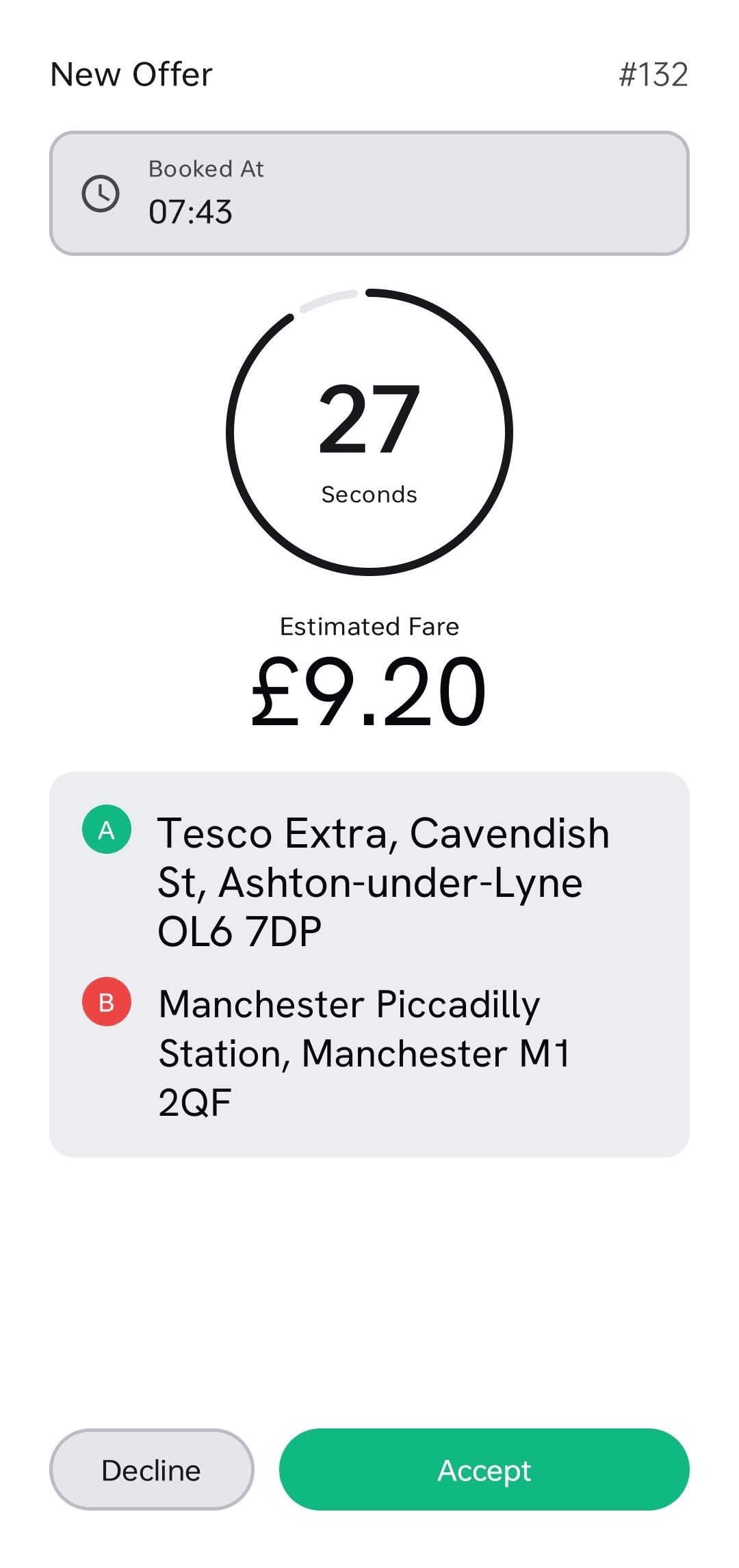
Each job arrives with pickup, destination, passenger name, payment method and the fare, plus a countdown. The driver accepts or lets it pass — there is nothing to work out and nothing to ring the office about.
Job offers with the fare attached, one-tap navigation with the meter floating over the map, earnings that update as the shift runs, chat with the office and a call button to the passenger — on the Android or iPhone the driver already owns.
The driver app is where a dispatch system either works or quietly does not. Controllers will tolerate a slow screen; drivers will not, and a fleet that stops trusting its app is back to ringing the office within a fortnight — which puts you where you started, with the software still on the invoice.
Cabica Driver runs on ordinary Android and iOS phones, with no in-cab hardware, no data head and no second device to charge. Drivers install it from the App Store or Google Play and sign in with your company ID; from then on they see only your firm’s jobs. Every offer arrives with the fare already calculated, and the app keeps working through the tunnels and car parks where signal disappears.
While a metered trip runs, the fare, time and distance float over whichever map the driver navigates with — Google Maps, Waze or Apple Maps — on Android and, since October 2026, on iPhone. To date, Cabica Driver is the one and only iPhone driver app whose meter floats over other apps rather than only over its own screens.
Built around the fact that a driver looks at this for two seconds at a time, at a junction, in the rain.
Each job arrives with pickup, destination, passenger name, payment method and the fare, plus a countdown. The driver accepts or lets it pass — there is nothing to work out and nothing to ring the office about.
One control puts the driver into the queue, holds their place through a break, or takes them off at the end. Queue position by zone is visible, so a driver can see where they stand rather than assuming they have been forgotten.
Pickup and drop-off hand straight to Google Maps, Waze or Apple Maps — whichever the driver already uses. We do not make them learn a worse map. While the meter runs, the fare, time and distance float over that map on iPhone and Android, so nobody switches apps at a junction to check the price.
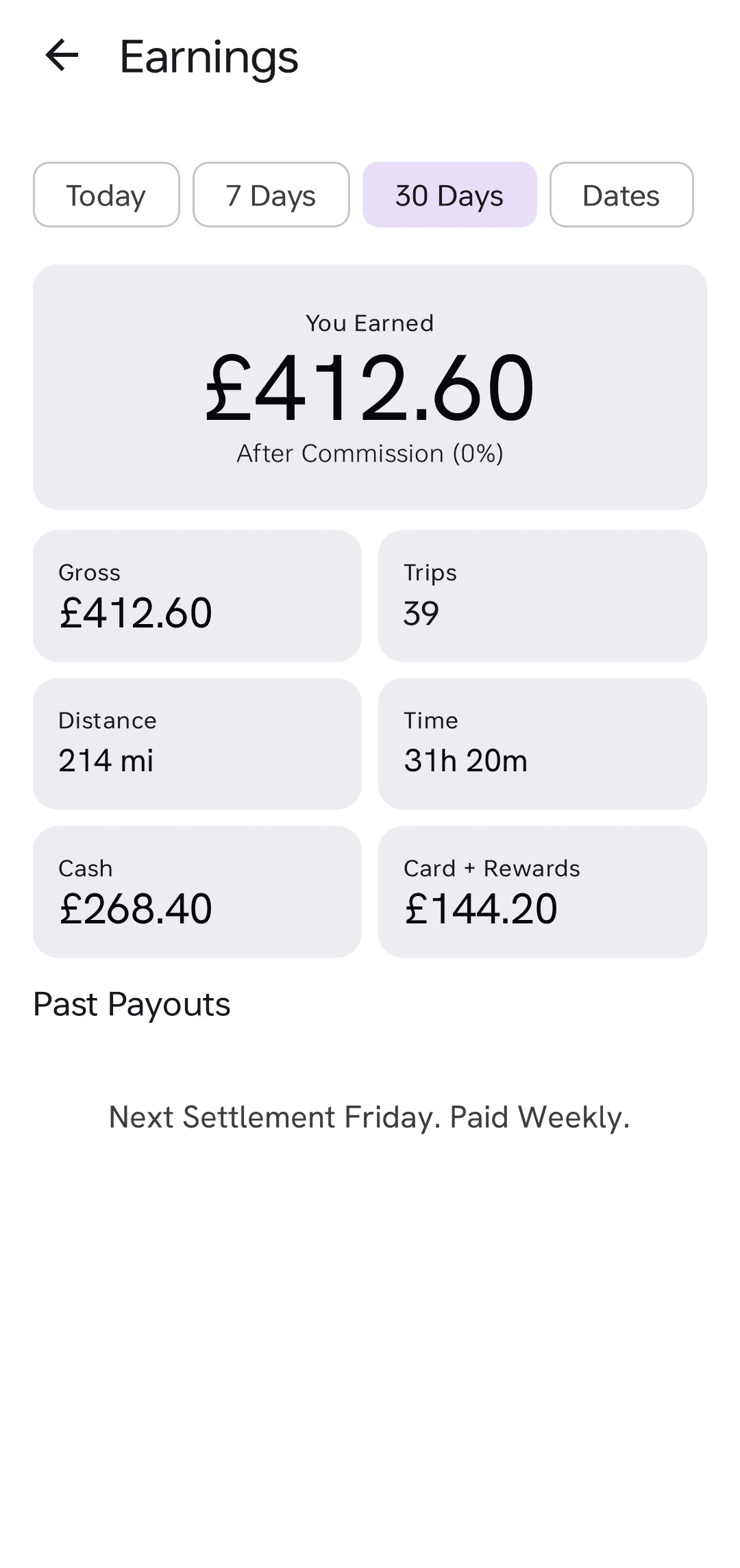
Completed jobs, cash taken, card fares and the running total for the shift and the week, on the driver’s own screen. Most settlement arguments are a driver and an office looking at different numbers; this is the same number.
Licence, badge, insurance, MOT and PHV plate photographed and uploaded from the phone, with a reminder before each expiry. The compliance chase stops being a job somebody in the office does by hand.
Chat with the office, or with the passenger on a live job, and call the passenger in one tap — through the office number or over the internet, so neither side shares a mobile. “I am outside and there is nobody here” becomes something the controller can act on rather than a radio call that interrupts everyone.
A dispatch system is only as good as the fleet’s willingness to use it. Three things decide that, and none of them appear on a feature list.
The first question a driver asks about any new system is whether it is fair. Not whether it is fast — whether the jobs are being handed out honestly, or whether somebody’s cousin is getting the airport runs.
Showing queue position by zone answers that without anyone having to be believed. The driver can see they are fourth in the town centre and second at the station, and that the job which just went past them went to somebody who had waited longer. A broadcast system — which is what a WhatsApp group is, and what several older platforms do — cannot answer it at all, because the fastest thumb wins and everybody knows it.
The behaviour change that follows is the point. Drivers stop hunting for jobs and start holding position in the zone where the work is, and that is what makes the rest of auto-dispatch work.
Multi-storey car parks, railway underpasses, rural B-roads and the middle of a large hospital site all take signal away for long enough to break a naive app. If it forgets a job in progress, or silently fails to send an arrival status, the driver rings the office — and every one of those calls is the software costing you time rather than saving it.
Cabica’s app treats the connection as unreliable by default: job state lives on the phone, status changes are queued and replayed on reconnect, and the driver is not returned to a login screen mid-job. It is unglamorous engineering, and it is the single largest determinant of whether a fleet keeps using an app.
Friday afternoon in most taxi offices involves at least one driver disagreeing with their settlement, and almost always for the same reason: the driver has their own record of the week, the office has another, and there is no shared version.
Because the fare is written once when the job completes, the driver’s running total and the office’s settlement are literally the same rows. The driver watches it accumulate through the week rather than meeting a figure for the first time on payday. Disputes do not vanish, but they become questions about one job rather than about the whole week.
Ordinary Android and iPhone handsets — the ones your drivers already own. There is no in-cab data head, no tablet to buy and no second device to charge. Any phone new enough to run a current version of Android or iOS will run it.
The app holds its state. A job in progress stays in progress, status changes made underground or in a multi-storey are queued on the phone and sent the moment signal returns, and the driver is never dropped back to a login screen mid-job. This is worth testing on any system you are shown, because tunnels and car parks are a daily event rather than an edge case.
No. There is one app, Cabica Driver, for every firm on the platform. Drivers install it from the App Store or Google Play and sign in with your company ID, and from then on they see only your jobs, your fares and the settings you choose for them. It also means there is nothing to build or wait for before your drivers can start.
Yes, on iPhone and Android. While a metered trip runs, Cabica Driver keeps the fare, time and distance on screen over Google Maps, Waze or Apple Maps, updating every second, and on iPhone the fare is on the lock screen too. To date it is the one and only taxi driver app for iPhone whose meter floats over other apps; others that advertise a floating meter show it only over their own map. Your firm can switch it off in App Settings → Driver App.
Yes. The fare is calculated when the booking is taken, so it is attached to the offer the driver sees. Accepting a job with the fare already on it is what removes most doorstep negotiation and most calls to the office.
It reports location on a duty cycle rather than streaming continuously, which is the difference between a phone that lasts a shift and one that does not. Drivers on long shifts should still expect to run a car charger, as they would for navigation alone.
Yes, one at a time. Cabica Driver signs in to one firm with that firm’s company ID, so a driver badged with two operators signs out of one and into the other, and neither firm sees the other’s jobs.
No. It is included in every plan, for every driver on that plan. Drivers beyond the plan’s included count are £3 each per month, which covers their app as well as their place in dispatch.