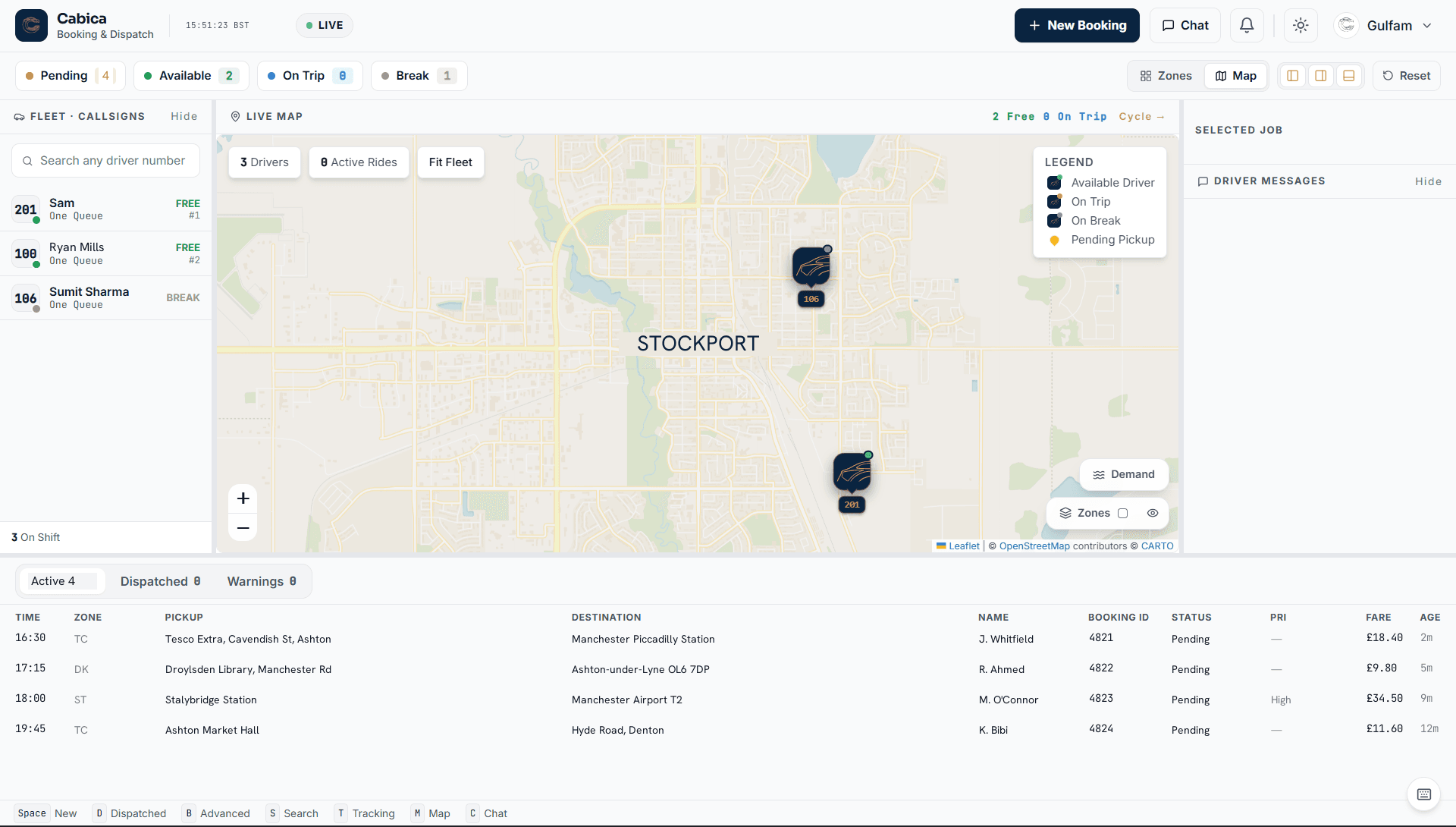
Cabica is cloud-based taxi dispatch software for UK taxi and private-hire operators. It replaces the whiteboard, the radio and the three systems that don’t talk to each other with a single dispatch console — bookings come in from the phone, your app or your booking website, and go out to the right driver automatically.
Dispatch runs on zones and queue position, so the driver who has waited longest in the right area gets the job. Your controller keeps full manual override on every booking: reassign, hold, price it by hand, or push it back to the queue. Nothing about the platform stops an experienced controller working the way they always have — it just removes the parts that were never worth doing by hand.
Taxi Dispatch Software at a Glance
Deployment
Cloud — runs in a web browser
Dispatch method
Automatic by zone and queue, with manual override
Driver app
Android and iOS, on ordinary phones
Booking channels
Phone, passenger app and booking website
Airport work
Flight tracking moves the pickup with the landing
Payments
Stripe card, pay-by-link, cash and metered
Hardware needed
None — no server, no in-cab data head
Fleet size
5 to 500+ vehicles
Time to go live
Days, not months
Pricing
From £100 a month, drivers included
Minimum term
None on Starter or Professional
What the Dispatch Console Does
Everything a controller touches in a shift, on one screen — built to be fast and keyboard-driven rather than pretty and slow.
Automatic Dispatch by Zone
Draw your zones on the map once. New bookings offer themselves to the longest-waiting driver in the pickup zone, roll on to the next driver if the offer is missed, and land in the controller’s lap only when nobody takes them.
Live Fleet Map and GPS Tracking
Every driver’s position, status and current job, updating in real time. See who is free, who is on a job, who has gone quiet — and how long the queue is in each zone before you commit to a pickup time.
Bookings From Every Channel
Phone bookings typed straight into the console, app bookings from passengers, web bookings from your own booking site, and scheduled or recurring jobs for account customers — all in the same board.
Fares Priced Before Dispatch
Zone-to-zone and fixed prices, metered and mileage tariffs, waiting time, surge, a council night tariff that switches itself on at set hours, and Christmas and bank-holiday surcharges are applied when the booking is taken — so the passenger gets a price up front and the driver gets no argument at the end.
Flight Tracking for Airport Pickups
Add a flight number and the booking follows the flight: the pickup time moves when the landing does, the board shows the flight’s status, and the driver sees the terminal and how late it is on the offer. Runs on your own flight-data key, switched on per firm.
Zones Drawn the Way Your Patch Is
Draw zones freehand, carve an airport out of a big one, split one in two, or build a whole service area from postcode districts in one go. Zone-to-zone prices and the driver queue both read from the same map.
Calls That Land on the Booking
Connect a phone system — Yay.com, Wavetel or Telnyx — and the caller’s record pops up while the phone is still ringing. Driver and passenger can call each other through the office number, so neither sees the other’s mobile.
Payments Taken Either Way
Stripe card payments in the passenger app, a texted pay-by-link for phone bookings, or cash as usual. Driver settlements and account invoices are worked out from the same data, so the week reconciles itself.
Compliance That Chases Itself
Driver licences, badges, MOT, insurance and PHV plates are stored against each driver and vehicle, with expiry alerts before the date — not after the council asks.
How Automatic Dispatch Actually Works
Most vendors describe this part as “AI-powered” and leave it there. Here is the real mechanism, in the order it happens on a live job.
The Job Is Priced Before Anyone Is Offered It
A booking is given its fare at the moment it is taken, not when it finishes. The system reads the pickup and destination against your zone-to-zone tariff table, applies whatever rules are live at that minute — time of day, surge band, airport pickup fee, waiting time, a corporate account’s negotiated rate — and produces one number.
This ordering matters more than it sounds. A passenger quoted before they commit does not ring back to argue, and a driver who accepts a job with the fare already attached is not negotiating on the doorstep. Firms that meter everything and price afterwards spend a real part of every week on fare disputes a price-first system never generates.
Metered fares are still there where you want them, and some work genuinely suits them — long open-ended jobs, hourly hires, anything where the route is the passenger’s to decide. The point is that it becomes a choice you make per tariff rather than the only thing the software can do.
It Is Offered to One Driver, Not Broadcast to Everybody
The booking goes to the driver holding the longest wait in the pickup zone. One driver, one offer, a countdown on screen. It is not thrown at the whole fleet for whoever taps first.
Broadcast dispatch — which is what a WhatsApp group is, and what several older systems do — has two failure modes that never go away. Drivers learn to cherry-pick, so the airport run is gone in a second while the four-pound school job sits there until somebody is told to take it. And the fastest phone wins rather than the longest wait, which is the thing your drivers will actually fall out over.
Queue position by zone fixes both, because the order is decided by the system and every driver can see where they stand in it. Drivers stop hunting for jobs and start trusting the queue, and that behaviour change is what makes the rest of it work.
If It Is Missed, It Cascades Outward
An offer not accepted inside the timeout passes to the next driver in the same zone, and then the next. When the zone is exhausted the job cascades into the neighbouring zones you have marked as adjacent, widening rather than jumping somewhere at random.
Only when nobody has taken it does it land in front of a controller, flagged. That is the design goal of the whole system: the office should see the exceptions, not the traffic. A busy Friday where the controller touches nine bookings out of two hundred is the system working, not the system idle.
The Controller Keeps the Final Say, Always
Every booking on the board can be reassigned, held, re-priced, moved to another vehicle or pushed back into the queue by hand, at any point in its life. Auto-dispatch is a default, not a lock.
This is worth being blunt about, because it is the fear that stops most firms switching. An experienced controller who knows the Thursday hospital run needs the driver with the ramp, and that one regular will not travel in a particular car, is holding knowledge no dispatch algorithm has. The software exists to stop that person spending a whole shift allocating jobs a computer could allocate — not to overrule them on the ones where they are right.
The Job Closes Itself Into the Ledger
When the driver marks the job complete, the fare, the payment method, the driver’s share and any commission are written once and reused everywhere — the driver’s settlement for the week, the account customer’s invoice at month end and the reports you run on Monday all read the same row.
The practical effect is that the week reconciles itself. There is no export-to-spreadsheet step between what happened on the road and what appears on an invoice, and that step is where most of the arithmetic errors in a taxi office come from.
Built for Firms That Already Have the Phones Ringing
Taxi and private-hire operators running 5 to 500+ vehicles
Firms still dispatching by radio, whiteboard or WhatsApp group
Operators paying per-booking commission to a national app
Offices on legacy dispatch systems with an on-site server to babysit
Multi-branch firms that need one view across every base
Written to be useful even if you buy from somebody else. These are the questions that decide whether you are still happy in year two, and most of them never come up on a demo call.
1
How long does a repeat phone booking take?
At most firms the majority of work still arrives by telephone. Time it on the demo, using a real regular customer’s details: if a controller cannot take that booking in under twenty seconds, nothing else about the software will make up for it across a Friday night.
2
What does the driver app do when it loses signal?
Tunnels, multi-storey car parks and rural notspots are a daily event, not an edge case. Ask to see the app put into aeroplane mode mid-job. An app that loses its state, or silently fails to send a status, creates office work every single shift.
3
Whose Stripe account, and whose developer account?
If card money lands in the vendor’s account before yours, they sit between you and your income. If the passenger app is published under the vendor’s Apple and Google developer accounts, they own the listing, the URL and the reviews — and you start again from zero downloads if you ever leave.
4
What are the limits, in numbers?
Zones, tariffs, office logins, drivers, saved addresses. “Unlimited” in a brochure and a cap in the software are a common mismatch. Get the numbers written into the quote, and ask what happens the first time you hit one on a Saturday.
5
What does leaving cost?
The question nobody asks on the way in. Can you export your passenger records, addresses and booking history; in what format; how quickly; and at what price? Get the answer in an email rather than on a call. Any vendor confident in their product will put it in writing.
6
Who answers at two in the morning?
Your busiest hours are precisely when most software companies are shut. Ask what the support hours actually are, what the out-of-hours route is, and what happened the last three times somebody used it.
7
What is the total annual cost at 150% of your current fleet?
Not this month — next year, at the size you are aiming for, including setup, app build, SMS bundles and the support tier. Per-vehicle and per-booking deals look cheapest on a demo and separate sharply from flat fees exactly as a firm succeeds.
FAQ
Common Questions
What is taxi dispatch software?
Taxi dispatch software is the system a taxi or private-hire office uses to take bookings, price them, assign them to drivers and track the job through to payment. Modern cloud systems like Cabica replace the radio and the paper log: bookings arrive from the phone, an app or a website, the software offers each job to the nearest available driver automatically, and the office watches the whole fleet on a live map.
Do we need to install anything or buy hardware?
No. The dispatch console runs in a normal web browser on the computers you already have, and the driver app runs on ordinary Android and iOS phones. There is no on-site server, no in-cab data head to fit and no engineer visit.
Can controllers still dispatch jobs manually?
Always. Auto-dispatch handles the routine work, but every booking can be assigned, reassigned, held, re-priced or pushed back to the queue by hand. Controllers keep the final say on every job.
How long does it take to switch dispatch systems?
Days rather than months. We configure your zones, tariffs and branding, import your drivers, vehicles and customers from CSV exports of your current system, and run your team through the console before you go live.
How much does taxi dispatch software cost?
Cabica starts at £100 a month for up to 10 drivers, £220 a month for up to 50, and £300 to £1,200 a month for Enterprise fleets and multi-branch operations. Extra drivers are £3 each per month. There is no per-booking commission — you are not charged a slice of every fare.
What is the difference between taxi dispatch software and a booking app?
The booking app is one way work arrives; the dispatch software is what decides who does it. A passenger app takes the job from the customer, prices it and passes it in. Dispatch is the layer behind that: it holds the driver queue, offers the job, cascades it if it is missed, tracks it to completion and settles the money. A booking app on its own still leaves somebody deciding which driver goes — which is the job dispatch software exists to remove.
What happens if the office internet goes down?
Dispatch keeps running, because it is not running on a machine in your office — it is running in the cloud, and the drivers are connected to it directly through their phones on mobile data. Jobs already in the system continue to be offered, accepted and completed. What you lose is the office view until you are back online, and a phone tethered to a laptop is enough to restore that. A system with an on-site server has the opposite failure mode: when the office goes, everything goes.
Does it handle account work, contracts and airport transfers?
Yes, and they are usually why a firm outgrows a whiteboard. Corporate accounts get their own rates, cost centres and monthly invoices raised from completed jobs. Scheduled and recurring bookings cover school runs, hospital contracts and standing weekly jobs. Airport work gets flight tracking — the pickup time follows the landing — plus booking notes for the driver and its own tariff rules, including the waiting charges that are otherwise argued about afterwards.
How many vehicles do we need before dispatch software is worth it?
Around five is where most firms feel it, and the deciding factor is not fleet size but how much of the day somebody spends allocating jobs by hand. A three-car firm doing mostly pre-booked account work can run on a diary for a long time. A five-car firm taking cash work off the phone on a Friday night cannot, and the cost of the software is small against the bookings that get lost when the phone is engaged.
Can we run Cabica alongside our current system while we switch?
Yes, and it is the sensible way to do it. Most firms run both for a week or two: new bookings go into Cabica while existing forward bookings play out on the old system, so nothing has to be moved mid-job. Drivers and customers import from CSV exports beforehand, and the changeover happens on a quiet weekday rather than a Friday.