Skip to content
Cabica
Chauffeur Services

Chauffeur Booking Software and a Customer App to Match

For executive and chauffeur firms: vehicle classes priced by the journey or by the hour, meet & greet with a name board, quotes your clients accept with a card deposit, and a chauffeur website and customer app in your own name.

  • By the journey or by the hour
  • Meet & greet with a full-screen name board
  • Quotes accepted online, with a card deposit
  • A chauffeur website and app in your name
dispatch.cabica.co.uk
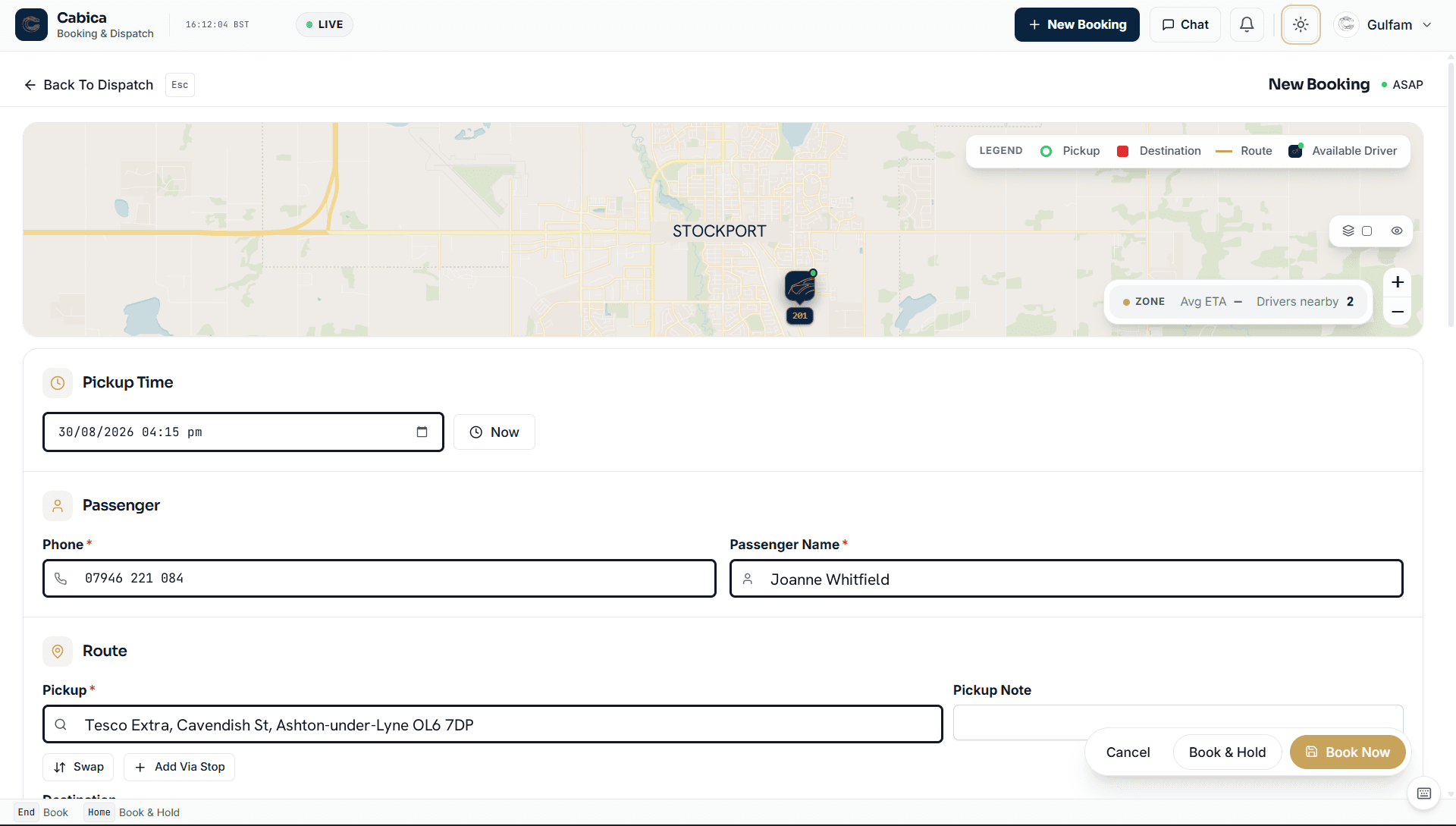
The Cabica booking form, where the office takes chauffeur bookings as well as everyday work

Chauffeur work is not taxi work in a nicer car. A client books an executive saloon for four hours “as directed”, wants the driver waiting in arrivals with their name on a board, and expects a quote before anything is confirmed. Most dispatch systems were built for A to B at a metered price, so chauffeur firms end up running bookings in a spreadsheet beside them.

Cabica runs chauffeur work on the same dispatch board as everything else. Each vehicle class carries an hourly rate, a minimum hire and the passengers and bags it takes. An hourly hire needs no destination, meet & greet adds your fee and the name for the board, and a hire that runs over is charged in your own blocks of extra time when the driver completes it. Chauffeur services are switched on for your firm by our team.

Chauffeur Services at a Glance

Booking
By the journey or by the hour
Vehicle classes
Hourly rate, shortest hire, seats and bags
Extra time
Added in your blocks at the hourly rate
Meet & greet
Your fee, and a full-screen name board
Quotes
Sent by text and email, accepted online
Deposits
None, a share or full, by card
Payments
Into your own Stripe account
Website
Chauffeur site in your name, your domain
Customer app
In your name — arranged with sales
Switched on
Per firm, by Cabica

What a Chauffeur Firm Gets

The parts of chauffeur work a taxi system leaves out, on the same board as the rest of your jobs.

Vehicle Classes, Priced by the Hour

Set up your classes — Executive, Luxury, MPV, whatever you run — each with an hourly rate, the shortest hire you take, and how many passengers and bags it holds. A journey in a class is priced by its own tariff, so a client sees the right price for the car they chose.

Hourly Hire, Extra Time Included

Book by the hour with no destination needed. The board marks it “4H”, the driver sees the hire length on the offer, and if the hire runs over, the extra time is added in your own blocks (per 15 minutes, say) at the hourly rate when the driver completes it.

Meet & Greet With a Name Board

Tick meet & greet, type the name, and your fee is added. The board marks the job “M&G”, and on the job the driver opens the name full screen, large and black on white, with the phone kept awake while they wait in arrivals.

Quotes Your Clients Accept Online

Quote requests arrive from your website, your app and the phone. Check the price, set the deposit and how long the quote stands, and send it: the client gets a text and an email with a link, accepts, pays the deposit by card, and it becomes a booking at that price.

Deposits Into Your Own Stripe Account

Ask for no deposit, a share or the full price. Deposits go straight to your own Stripe account, the driver sees what was paid and collects the rest at the end, and a quote paid in full has nothing left to collect.

Your Chauffeur Website and App

A chauffeur website in your name on your own domain, showing your cars with their prices, booking by the journey or by the hour with meet & greet, and a quote form. And a chauffeur customer app in your name that leads with the car, with a Quotes tab where clients ask for a price and accept yours.

How a Chauffeur Booking Runs

From the first enquiry to the driver collecting the balance, the way it works in Cabica.

The Enquiry Becomes a Quote

Chauffeur clients often want a price before they commit: a wedding, a corporate roadshow, a long airport run. A quote request arrives from your chauffeur website, your app or the phone, and the Quotes button on your board counts the ones waiting for a price.

You open it, check the price (the price list’s figure is shown where there is one), set the deposit and how long the quote stands, and send it. The client gets a text and an email with a link. When they say yes on the phone, Book now turns it straight into a booking.

The Quote Becomes a Booking

On the link, the client accepts and, if you asked for one, pays the deposit by card. The deposit goes to your own Stripe account and the booking lands on your board at the agreed price, marked as an hourly hire or meet & greet where it is one.

Bookings that need no quote go straight in: from your chauffeur website, where clients see every car’s price before they book, from your app, or typed in by the office, where the booking form has its own chauffeur section for the class, the hours and the name for the board.

The Driver Has Everything on the Phone

The driver’s offer shows the hire length (“Hourly Hire · 4 hours”), meet & greet with the name for the board, and any deposit already paid, so they know what the job is before they accept it. In arrivals, Show Name Board puts the name full screen.

At the end, the price already accounts for the deposit and for any overtime on an hourly hire, so the driver collects the right balance and nobody works it out at the kerb.

Built for Firms That Do This Kind of Work

  • Executive and chauffeur firms booking by the hour
  • Airport transfer firms meeting clients in arrivals
  • Taxi firms adding an executive or chauffeur line
  • Firms quoting weddings, events and corporate days by email today
  • Anyone running chauffeur bookings in a spreadsheet beside their dispatch system
Book a Demo
FAQ

Common Questions

Can Cabica take bookings by the hour?

Yes. Each vehicle class has an hourly rate and a shortest hire, and an hourly booking needs no destination. If the hire runs over, the time past the booked hours is added in your own blocks at the hourly rate when the driver completes the job, so overtime is charged without anyone working it out by hand.

Does the driver get a name board for meet and greet?

Yes. A meet & greet job shows the name on the driver’s offer and job screen, and Show Name Board opens it full screen, as large as the name allows, with the phone kept awake. Your meet & greet fee is added to the price when the booking is taken.

How do quotes and deposits work?

A quote request comes in from your website, your app or the phone. You check the price, choose the deposit (none, a share or the full price) and how long the quote stands, and send it. The client gets a text and an email with a link, accepts, and pays the deposit by card into your own Stripe account. The accepted quote becomes a booking at that price.

Is there a chauffeur app for our customers?

Yes. A chauffeur customer app in your own name books by the journey or by the hour with your classes and prices, takes meet & greet with the name for the board, and has a Quotes tab where clients ask for a price and accept yours. Like any passenger app in a firm’s own name, it is published on your own Apple and Google accounts and arranged with our sales team.

Can we run taxi and chauffeur work together?

Yes. Chauffeur jobs sit on the same dispatch board as the rest of your work, marked 4H for an hourly hire and M&G for meet & greet, and the same drivers can do both. If you allocate chauffeur jobs yourself rather than letting the system offer them, we can switch automatic dispatch off for your firm.

How do we get chauffeur services switched on?

Talk to our sales team. Chauffeur services are switched on for your firm by Cabica, and once they are, your classes, rates, meet & greet fee, deposits and quote settings are all in your own settings.

WhatsApp UsCall +44 7367 063688Email Sales